5.1 Introduction to JFC
Swing
Introduced in 1997 to overcome issues of AWT
Swing is part of Java Foundation Classes (JFC) and it is an API (Application Program Interface)
Used to create windows-based applications (applications with GUI)
Built on top of AWT (Abstract Window Toolkit)
Platform independent and light-weight (uses less system resources)
The Swing API is powerful, flexible — and immense.
javax.swing - this package provides classes for Java Swing API
JButton, JTextField, JTextArea, JRadioButton, JCheckBox, JMenu etc. are classes of Swing API (represent GUI component)
Differences between AWT and Swing
| AWT | Swing | |
|---|---|---|
| 1 | Platform dependent | Platform independent |
| 2 | heavyweight | lightweight |
| 3 | doesn't support pluggable look and feel | support pluggable look and feel |
| 4 | less components | much more components |
| 5 | doesn't follow MVC | follow MVC (Model - View - Controller) |
MVC (Model - View - Controller )
- Architecture (design approach)
- Model - data
- View - presentation
- Controller - Interface between Model and View ( manipulates data)
Java Foundation Classes
- JFC is short for Java Foundation Classes
- Set of classes for GUI Components and other services
- provide rich graphics functionality and interactivity to Java applications
- ease the development and deployment of commercial-quality desktop and internet/intranet applications
- JFC is superset of AWT, means it extends AWT by adding more components and services
- JFC is core to Java 2 Platform, means it is part of Java
- All JFC components are JavaBeans Components, JavaBeans components offer -- re-usability, interoperability, and portability.
- No framework lock-in, means one can use third-party components
- JFC offers open architecture and is purely platform-independent
- Fully customizable - Developers can easily extend these components to create other more customized components.
- Pluggable Look and Feel - look and feel of the components can be changed
- Java 2D - for handling 2 - dimensional graphics
Features/Foundation Services provided by JFC
1. Swing GUI Components - Includes GUI Components, Sorting, Printing, Darg and Drop etc.
2. Plug-gable Look and Feel Support - Look and Feel of Swing Components is plug-gable means one can choose look and feel from 100(s) of available look and feel.
3. Accessibility API - Enables assistive technologies, such as screen readers and Braille displays, to get information from the user interface.
4. Java 2D API - high-quality 2D graphics, text, and images in applications and applets. Java 2D includes extensive APIs for generating and sending high-quality output to printing devices.5. Internationalization - Allows developers to build applications that can interact with users worldwide in their own languages and cultural conventions.
Swing Packages
The Swing API is powerful, flexible — and immense. The Swing API has 18 public packages:
| javax.accessibility | javax.swing.plaf | javax.swing.text |
| javax.swing | javax.swing.plaf.basic | javax.swing.text.html |
| javax.swing.border | javax.swing.plaf.metal | javax.swing.text.html.parser |
| javax.swing.colorchooser | javax.swing.plaf.multi | javax.swing.text.rtf |
| javax.swing.event | javax.swing.plaf.synth | javax.swing.tree |
| javax.swing.filechooser | javax.swing.table | javax.swing.undo |
Most of the time we will use only two swing packages - javax.swing and javax.swing.event
Hierarchy of java swing API
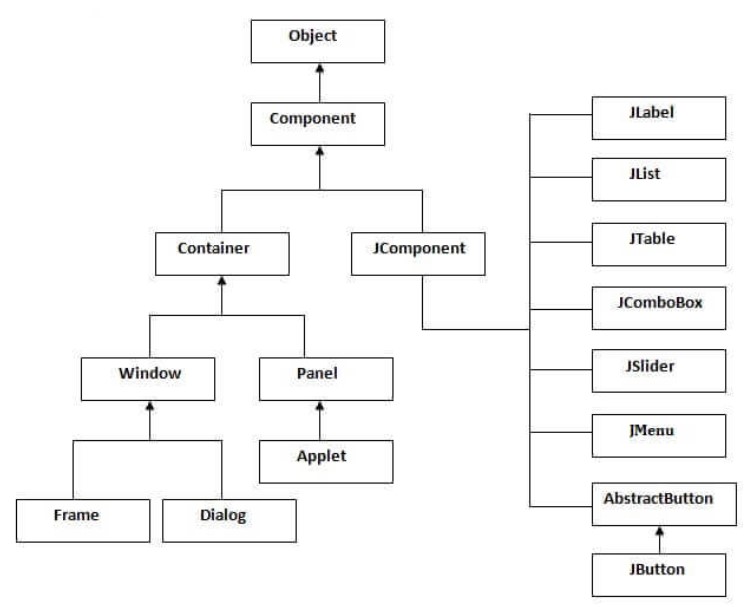
Fig. 5.1.1 Hierarchy of Swing API
Commonly used Methods of Component class
The methods of Component class are widely used in java swing that are given below.
| Method | Description |
|---|---|
| public void add(Component c) | add a component on another component. |
| public void setSize(int width,int height) | sets size of the component. |
| public void setLayout(LayoutManager m) | sets the layout manager for the component. |
| public void setVisible(boolean b) | sets the visibility of the component. It is by default false. |
How to create a GUI application using Swing API -
Method 1 - By using object of JFrame class as member of other class (association)
Method 2 - Other class can inherit the JFrame class (Inheritance)